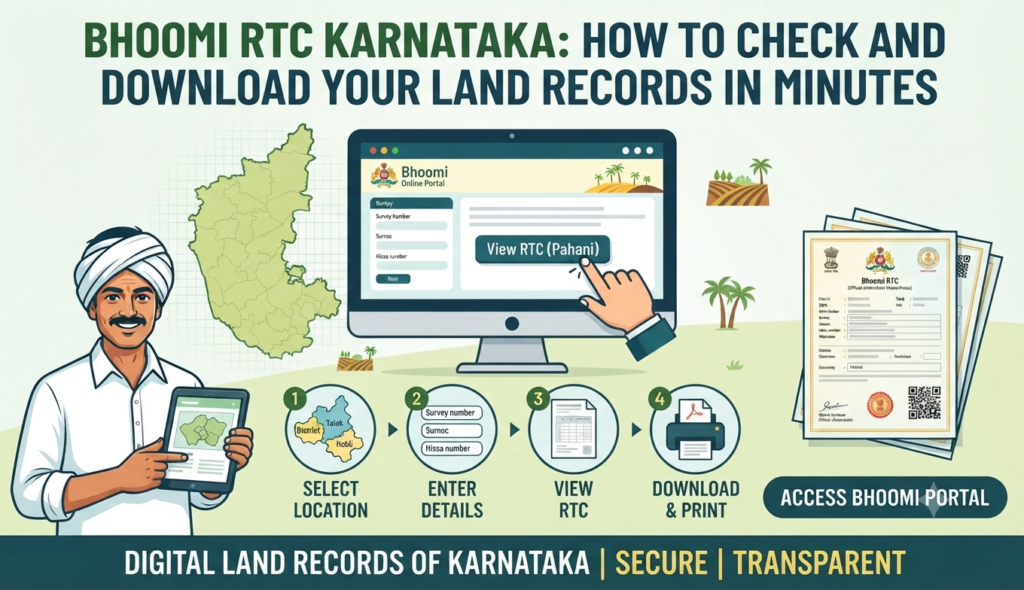
If you are buying farmland, verifying ownership, or applying for a crop loan in Karnataka, the one document you will keep coming back to is the RTC. The good news is that checking and downloading your Bhoomi RTC Karnataka land records now takes minutes on the state’s official portal, without a single visit to the taluk office. This guide walks you through exactly how it works in 2026.
What is Bhoomi and what is an RTC (Pahani)?
Bhoomi is the Karnataka government’s flagship land-records digitisation programme, run by the Revenue Department. It was one of India’s earliest efforts to move handwritten village land registers online, and today it powers the citizen portal at landrecords.karnataka.gov.in.
The RTC — short for Record of Rights, Tenancy and Crops — is popularly called the Pahani. It is the single most important land document for agricultural land in the state. A single RTC extract tells you:
- The survey number, hissa (sub-division) number and total extent of the land
- The name(s) of the current owner(s) and the nature of their rights
- Any liabilities such as loans, mortgages or court orders noted against the land
- The type of soil, crops grown, and irrigation source
- The Khata number and details of any recent mutation (ownership change)
Because it records both ownership and cultivation, the RTC is what banks, buyers and government departments rely on to confirm who genuinely controls a piece of agricultural land.
How to check and download your RTC Pahani online
Here is the step-by-step process to download RTC Pahani online in Karnataka from the official Bhoomi portal:
- Open the Bhoomi portal at landrecords.karnataka.gov.in and click on the “View RTC and MR” service.
- Select your District, then Taluk, Hobli and Village from the drop-down menus.
- Choose the Survey Number of the land parcel.
- Select the Surnoc, Hissa Number and the period/year for which you want the record.
- Click Fetch details or Go. The RTC extract appears on screen showing ownership and crop details.
- Use your browser’s print or save option to keep a Bhoomi RTC Pahani download PDF for your records.
This on-screen copy is free and perfect for a quick check. However, it usually carries a “not for legal use” watermark. If you need a legally valid, tamper-proof version, use the i-RTC (digitally signed RTC) service, which delivers a signed PDF for a small statutory fee — verify the current charge on the portal, as it changes from time to time.
Related Bhoomi services worth knowing
The Bhoomi portal does far more than show ownership. A few services that come in handy during a property transaction:
| Service | What it tells you |
|---|---|
| Mutation Status (MR) | Whether an ownership change (sale, inheritance, gift) has been recorded and its stage |
| Mutation Register | The history of how the land changed hands over the years |
| Tippani / Mojini | Survey sketch and measurement details from the survey department |
| Dispute (Section 11) status | Whether the land has any recorded revenue dispute |
Reading the mutation register alongside the RTC gives you a fuller picture than the RTC alone. To see the actual shape and boundaries of a parcel, pair this with the Bhu-Naksha map service — our guide on how to read a Bhu Naksha plot map explains that in detail.
Bhoomi RTC vs urban property records
An important limitation to understand: Bhoomi covers agricultural (rural) land only. If your property is a flat, site or building within a city corporation’s limits — say, within BBMP in Bengaluru — the RTC will not apply. Urban ownership in Karnataka is now recorded through the digital Khata system.
For city properties, you should instead check the E-Aasthi Karnataka property records portal, which issues the e-Khata for urban assets. Knowing which system your property falls under saves a lot of wasted effort at the wrong counter.
Why RTC verification matters before you buy
Skipping RTC verification is one of the most common — and costly — mistakes in a Karnataka land deal. A careful RTC verification before buying property in Karnataka helps you confirm several things at once:
- Ownership match: The seller’s name on the RTC should match their identity documents and the sale-related papers.
- Encumbrances: Loans or mortgages noted on the RTC warn you that a bank may have a claim on the land.
- Land classification: The RTC shows whether the land is agricultural — important if you plan to build or need it converted (DC conversion) to non-agricultural use.
- Extent accuracy: The area on the RTC should tally with the physical measurement and the survey sketch.
Always cross-check the RTC against the sale deed history and an encumbrance certificate from the sub-registrar. Together, these three documents form the backbone of clean-title due diligence. For anyone eyeing homes in and around the city, our Bengaluru property guide covers the localities and projects worth a closer look, and the property registration charges in Bengaluru guide breaks down the stamp duty and fees you will pay at registration.
Common problems and how to fix them
Portal users occasionally hit snags. Here are the usual ones and what to do:
- Name not updated after a sale: This means the mutation is pending. Apply for mutation at the village accountant / taluk office or via the Nadakacheri / e-services channel.
- Survey number not found: Re-check the hobli and village selection; sub-division (hissa) numbering sometimes changes after a survey.
- Old handwritten records missing online: Very old pre-digitisation records may need a physical request at the taluk office.
- Mismatch in extent: Raise it with the survey department via the Mojini service before completing any purchase.
Frequently Asked Questions
Is the Bhoomi RTC downloaded online legally valid?
Can I check land ownership in Karnataka online without visiting any office?
What is the difference between RTC and mutation (MR)?
Does Bhoomi RTC cover flats and city properties?
What details do I need to download an RTC?
This article is for general information only and does not constitute legal or financial advice. Portal steps, fees and services can change, so verify current figures and procedures on the official Bhoomi / Karnataka Revenue Department portal before acting. Godrej Realty Homes is a property listings portal.