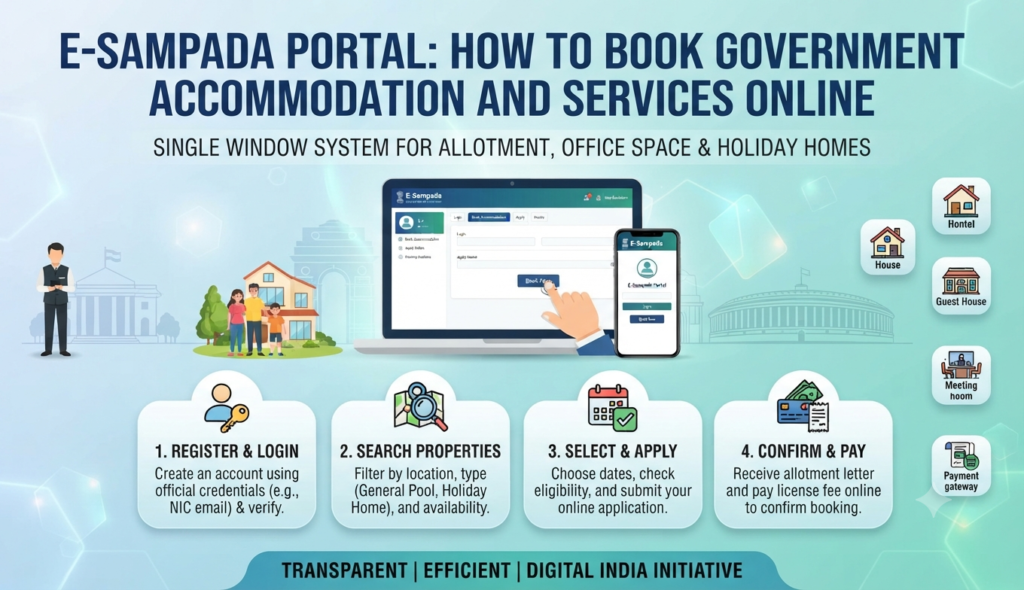
If you are a central government employee planning a holiday, or an official who needs government accommodation or a venue for an event, one website now handles it all. The e-Sampada portal login at esampada.mohua.gov.in is the single window through which the Directorate of Estates allots residential quarters, holiday homes, office space and venues like Vigyan Bhawan across India.
What is the e-Sampada portal?
e-Sampada is a digital platform launched on 25 December 2020 by the Ministry of Housing and Urban Affairs (MoHUA). It merged four earlier systems and mobile apps into one portal and app, so users no longer juggle separate websites for housing, holiday homes and venue bookings. The name plays on “Sampada” (assets), reflecting its role in managing government-owned real estate.
The portal centralises four broad services:
- Government residential accommodation — allotment and management of General Pool Residential Accommodation (GPRA) for eligible officials.
- Holiday homes and touring officers’ hostels — short-stay bookings at government-run holiday homes across cities and hill stations.
- Office space — allotment of General Pool Office Accommodation (GPOA) to government departments.
- Venue booking — reserving spaces such as Vigyan Bhawan and other government halls for events.
Who can register and use e-Sampada?
Access depends on the service. Eligible users generally include central government employees, PSU staff (for certain services), sitting Members of Parliament, judges of the Supreme Court and High Courts, and departments of the central government. State government officers may be eligible for specific facilities. For holiday homes in particular, serving and retired central government employees are the primary users, subject to the booking rules and priority categories in force.
If you fall outside these categories, you generally cannot book government accommodation — but many families instead choose private stays, and if you are researching a city to live in, our guide to the best cities to live in India is a useful starting point.
How to register and log in on e-Sampada
Setting up your account is straightforward:
- Go to the official portal at esampada.mohua.gov.in and click Sign In / Register.
- Choose the appropriate user type and complete the registration form with your name, designation, official email and mobile number.
- Provide the official identifiers required for verification of your eligibility.
- Submit the form and verify your mobile/email via OTP.
- Once approved, return to the sign-in page and complete your e-Sampada portal login with your credentials.
The same login works on the eSampada mobile app, so you can book on the move.
How to book a holiday home on e-Sampada
Holiday-home booking is the most-used service by employees. After logging in:
- Select Holiday Homes from the services menu.
- Choose your destination city and the holiday home or touring officers’ hostel.
- Enter your check-in and check-out dates and the number of rooms required.
- Submit the request; allotment is typically processed on a priority and availability basis, and bookings usually open a set number of days in advance.
- Once allotted, pay any applicable room charges online and download your booking confirmation.
Because demand for popular locations is high, book as early as the advance-booking window allows and keep your confirmation handy at check-in.
Checking your e-Sampada allotment status
To track a request, log in and open your dashboard, where pending, approved and rejected applications are listed. For an e-Sampada allotment status check, look under the relevant service tab (holiday home, accommodation or venue) to see the current stage of your request and any payment due. If a booking is not confirmed, the room usually returns to the pool for others, so cancel early if your plans change.
Government accommodation booking and other services
Beyond holiday homes, e-Sampada handles the full lifecycle of government accommodation — application, allotment, retention, no-dues and vacation of GPRA quarters. Departments use it for office-space allotment, and event organisers book venues through the same login. Payments, allotment letters and no-dues certificates are generated digitally, cutting the paperwork that used to require office visits.
For unrelated citizen services and certificates, other portals handle the load — for example, our guides to the eDistrict portal and obtaining a possession certificate cover documents e-Sampada does not issue. Always use the official esampada.mohua.gov.in address and avoid third-party sites that mimic the portal.
Frequently Asked Questions
What is the official e-Sampada portal URL?
Who is eligible to book a holiday home on e-Sampada?
How far in advance can I book a holiday home?
How do I check my e-Sampada allotment status?
Can I use e-Sampada if I am not a government employee?
This article is for general information only. e-Sampada services, eligibility and booking rules are set by the Directorate of Estates and change from time to time; always verify current details on the official esampada.mohua.gov.in portal before acting. Godrej Realty Homes is a property listings portal.