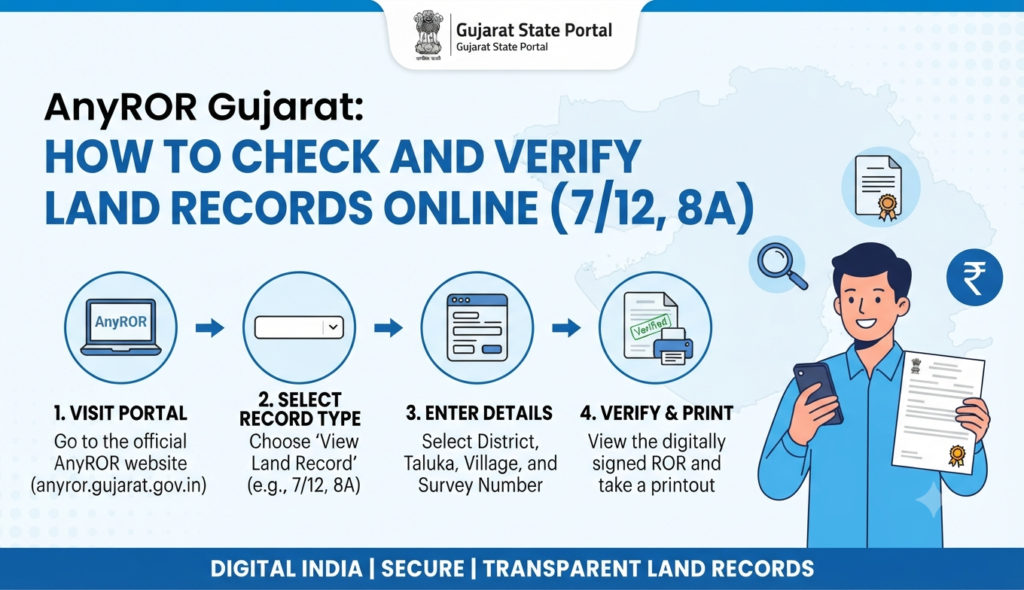
If you are buying land or a flat in Gujarat, checking the AnyROR Gujarat 7/12 online record is the single most important verification you can do before paying an advance. AnyROR — “Any Records of Rights, anywhere” — lets you view the 7/12 utara, 8A khata and urban property card of any survey number in the state from the official portal, anyror.gujarat.gov.in. This guide shows you exactly how to check and verify those records.
What is AnyROR Gujarat?
AnyROR is the Gujarat Revenue Department’s online land-records platform, powered by the state’s e-Dhara database. It brings rural and urban land records onto one website so a citizen can view ownership details, cultivation entries and mutation history without visiting the taluka office. The data you see on AnyROR is a live reflection of e-Dhara — once a mutation is examined and officially approved, the updated entry appears online; pending changes do not.
Understanding 7/12, 8A and the property card
Three documents do most of the work in Gujarat land verification:
- 7/12 utara (VF-7 / Village Form 7): the record of rights for a rural survey number. It shows the owner’s name, survey/block number, land area, tenure, crop and any charges or loans noted against the land. This is the record most people mean when they say “7/12.”
- 8A khata (VF-8A): the account extract that groups all survey numbers held by an owner under a single khata number, useful to see a person’s total landholding in a village.
- Property card: the urban equivalent of the 7/12, issued for city survey (non-agricultural) properties, showing owner, boundaries, usage and unit details.
Mutation entries are recorded in VF-6 (the mutation register), which tracks every change of ownership over time.
How to check AnyROR Gujarat 7/12 online (rural)
To view a rural 7/12 or 8A:
- Open the official AnyROR portal (anyror.gujarat.gov.in) and choose View Land Record – Rural.
- Select the record type — 7/12, 8A, or a VF form.
- Choose your District → Taluka → Village.
- Enter the Survey / Block number (or search by owner name/khata where allowed).
- Complete the captcha and click to view.
- The 7/12 utara or 8A appears on screen; you can print or save it.
This on-screen copy is for information. For a legally usable copy, download the digitally signed version described below.
How to check urban land records
For city properties, use View Land Record – Urban:
- Select the property card or unit property card option.
- Enter District, City Survey Office, ward and the survey/sheet numbers.
- Complete the captcha and view the ownership and boundary details.
If you are shortlisting homes in Gujarat’s big markets, browse current options in Ahmedabad and Vadodara, then verify each shortlisted property’s record on AnyROR before you commit.
How to download a digitally signed 8A / 7/12 (Nakal)
The plain view is not digitally signed. For an AnyROR 8A utara download or a signed 7/12 that banks and registrars accept:
- Go to the Digitally Signed RoR section on AnyROR.
- Log in with your mobile number and verify with the OTP.
- Select the record type and enter the location and survey details.
- Pay the nominal fee if applicable.
- Download the authenticated extract carrying a digital signature and verification number.
This digitally signed “Nakal” (copy) is the one to keep in your purchase file.
How to verify property ownership in Gujarat before buying
To verify property ownership in Gujarat and use AnyROR as a genuine safeguard, run these checks:
- Confirm the seller’s name matches the owner on the 7/12 or property card exactly.
- Check the “other rights” column for loans, mortgages or charges noted against the land.
- Review the mutation history (VF-6) so the chain of ownership is unbroken.
- For agricultural land, check the tenure type and whether non-agricultural (NA) permission exists before any residential use.
- Cross-check the survey number on a plot map — our guide on Bhu Naksha helps you match the record to the ground.
An AnyROR check is not a substitute for the registration-side due diligence: pair it with an encumbrance certificate and, for new projects, confirm the project’s RERA Gujarat registration.
Frequently Asked Questions
Is the AnyROR 7/12 record free to check?
What is the difference between 7/12 and 8A?
Is the online AnyROR copy legally valid?
Why can’t I see a recent ownership change on AnyROR?
Can I check land records in Gujarat without the survey number?
This article is for general information only. Land-record formats, portal features and fees in Gujarat can change — verify the current details on the official AnyROR portal (anyror.gujarat.gov.in) and consult a lawyer before acting on any purchase. Godrej Realty Homes is a property listings portal.