If you live in Rajasthan and have ever applied for a certificate, paid a utility bill, or checked a government scheme online, you have almost certainly needed an SSO ID. The SSO ID login Rajasthan system is a single sign-on gateway that lets you reach more than a hundred state government services with one username and password, instead of registering separately on each department’s website.
This guide walks you through what the SSO portal is, how to register, how to log in, how to recover a lost ID or password, and how to fix the login problems people run into most often.
What is the Rajasthan SSO ID?
SSO stands for Single Sign-On. Run by the Government of Rajasthan’s Department of Information Technology and Communication (DoIT&C), the portal at sso.rajasthan.gov.in gives every citizen, government employee, and business a single digital identity. Once you have an SSO ID, you use the same credentials to access e-Mitra, Jan Aadhaar, Rajasthan Sampark, Shala Darpan, the Employment Department, building plan approvals, GST and industry licences, scholarships, and dozens of other services.
The idea is simple: fewer passwords, one dashboard, and a verified identity that follows you across departments. For most residents the SSO ID becomes the front door to almost every online interaction with the state.
How to register an SSO ID (SSO ID kaise banaye online)
Registration is free and takes only a few minutes. Here is the step-by-step process for a citizen:
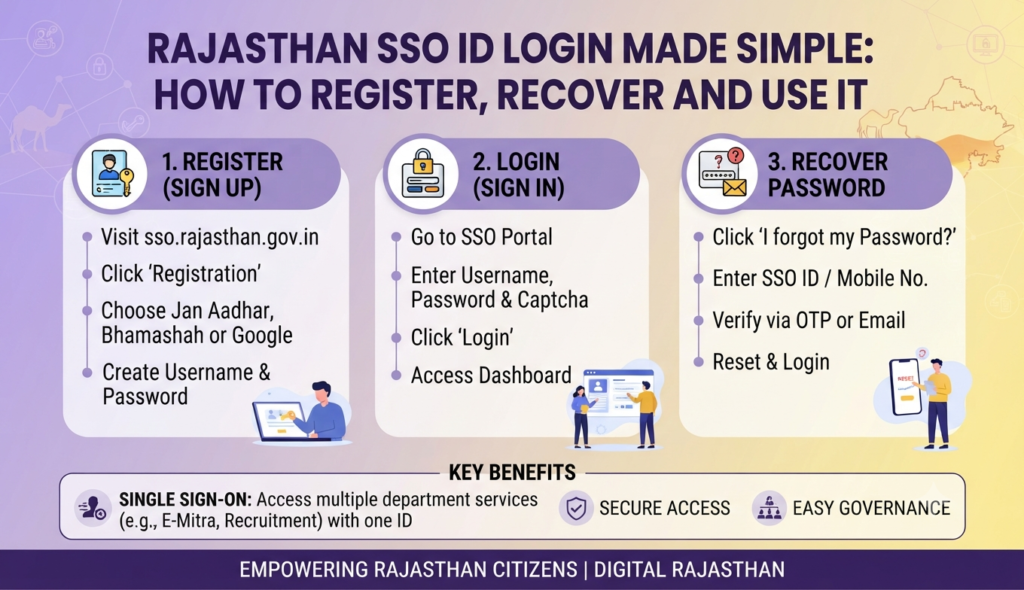
- Open sso.rajasthan.gov.in and click Registration.
- Choose the Citizen tab (separate tabs exist for Government Employee and Udyog/business).
- Pick a registration method: Jan Aadhaar, Google account, or Facebook. Jan Aadhaar is the most common route for residents because it links your family record automatically.
- Enter the requested details — name, mobile number, Jan Aadhaar number, and email.
- Verify the OTP sent to your registered mobile number.
- Create a strong password, confirm it, and submit.
Once you finish, the system generates your SSO ID (your username). Note it down; you will need it every time you log in. Government employees register with their SIPF number, and business owners use their Business Registration Number (BRN).
How to log in to the SSO portal
After registration, logging in is straightforward:
- Go to sso.rajasthan.gov.in and click Login.
- Enter your SSO ID (username) and password.
- Type the CAPTCHA shown on screen.
- Click Login to reach your personal dashboard.
Your dashboard shows a grid of application icons. Click any service to open it in the same signed-in session — no second login needed. You can also install the official SSO Rajasthan mobile app to log in on your phone using the same credentials.
Rajasthan SSO portal services list
The portal aggregates well over 100 services. The table below groups the ones citizens use most often.
| Category | What you can do |
|---|---|
| e-Mitra | Apply for certificates, pay electricity/water bills, recharge, and access hundreds of G2C services |
| Jan Aadhaar | Update family details, add members, download your Jan Aadhaar card |
| Rajasthan Sampark | File and track public grievances |
| Shala Darpan / Education | School information, scholarships, and student services |
| Employment | Register for jobs, apply for government vacancies and unemployment allowance |
| BPAS | Building Plan Approval System for property construction permissions |
| Business (Udyog) | GST enrolment, industry licences, and business registrations |
Because building approvals, land services, and utility payments all sit behind the same login, the SSO ID is genuinely useful for anyone dealing with property in the state. If you are researching documentation more broadly, our explainers on the eDistrict portal for certificates and the EWS certificate cover related processes step by step, and other states run comparable single-window systems such as IGRSUP in Uttar Pradesh for property registration.
How to recover a forgotten SSO ID or password
Losing your credentials is common and easily fixed:
- Forgot SSO ID: On the login page, click Forgot SSO ID, then verify through your registered mobile number, Jan Aadhaar, or email. The portal displays your username after OTP verification.
- Forgot Password: Click Forgot Password, enter your SSO ID, receive an OTP on your registered mobile or email, and set a new password.
Because recovery depends on your registered mobile number, keep that number active. If it has changed, you may need to visit an e-Mitra kiosk to update your contact details.
SSO ID login problem solution
Most login failures come down to a handful of causes. Try these fixes before assuming the site is down:
- “Invalid username or password”: Check for accidental spaces, ensure Caps Lock is off, and confirm you are typing your SSO ID (not your Jan Aadhaar number). Reset the password if unsure.
- CAPTCHA errors: Refresh the CAPTCHA image and re-enter it exactly, matching upper and lower case.
- OTP not received: Wait 60 seconds, check network signal, and confirm the mobile number linked to your account is correct and active.
- Page not loading or timing out: Clear your browser cache, try a different browser (Chrome usually works best), or attempt access during off-peak hours when traffic is lighter.
- Multiple accounts: Creating duplicate SSO IDs causes confusion. Use one ID consistently; duplicates can be merged or deactivated via support.
If nothing works, contact the DoIT&C helpdesk listed on the portal or visit your nearest e-Mitra centre for in-person help. And once your paperwork is in order, you can get back to the fun part — browsing homes across India.
Frequently Asked Questions
Is the SSO ID free to create?
Can I create an SSO ID without a Jan Aadhaar number?
How many services can I access with one SSO ID?
I forgot my SSO ID. How do I get it back?
Why is my SSO login not working even with the correct password?
This article is for general information only. Portal steps, service lists, and support channels can change, so verify current details on the official Rajasthan SSO portal (sso.rajasthan.gov.in) before acting. Godrej Realty Homes is a property listings portal and is not affiliated with the Government of Rajasthan.