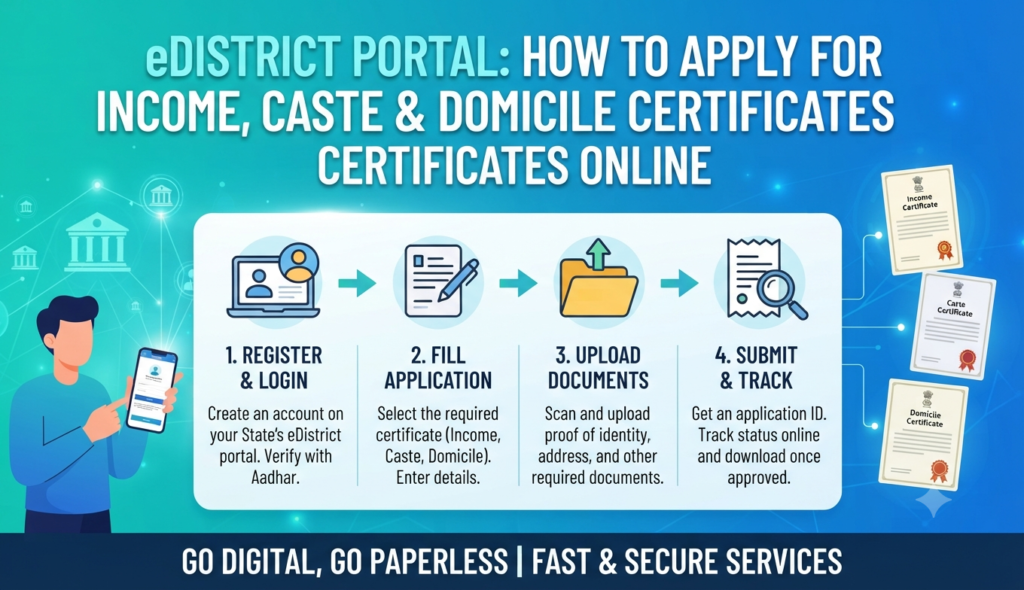
If you need an income, caste or domicile certificate for a school admission, government job, scholarship or reservation benefit, you no longer have to queue at the tehsil office. Almost every Indian state now lets you eDistrict apply certificate online through its own eDistrict portal, upload documents from home, pay a small fee and download a digitally signed certificate once it is approved. This guide walks you through the whole process in plain steps.
What is the eDistrict portal?
eDistrict is a Mission Mode Project under the Government of India’s Digital India programme. The idea is simple: bring citizen-facing services that were traditionally handled at the district or tehsil level — certificates, licences, pensions, grievance redressal — onto a single online platform in each state. Uttar Pradesh runs it as e-Sathi (edistrict.up.gov.in), Kerala, Assam, West Bengal, Delhi and most other states operate their own branded eDistrict portals, and Common Service Centres (CSCs) can apply on your behalf if you do not have internet access.
Because it is a state subject, the exact website, fee and list of required documents differ slightly from one state to another. The overall flow — register, log in, fill the form, upload proofs, pay, track, download — is almost identical everywhere. Always start from your own state’s official eDistrict domain rather than a look-alike site.
Which certificates can you apply for?
The most-requested documents on eDistrict portals are the three you probably came here for, plus several others:
- Income certificate — states your family’s annual income; needed for scholarships, fee concessions, EWS quotas and welfare schemes.
- Caste certificate — proof of SC/ST/OBC status for reservation in education and jobs.
- Domicile / residence certificate — proof that you are a resident of the state, needed for state-quota admissions, local jobs and some property matters.
- Birth and death certificates, character certificates, disability (divyang) certificates and various other district services.
An income certificate is often the first step toward an EWS certificate, since the EWS category is defined by an annual family income threshold.
How to register on the eDistrict portal
You only need to register once. On the UP e-Sathi portal, for example:
- Open your state’s official eDistrict website and click Citizen Login (in UP this is “e-Sathi”).
- Choose New User Registration.
- Enter your name, mobile number, email, district and a username of your choice, then set a password and a security question.
- Verify your mobile number with the OTP sent to you.
- Submit. Your username is now active and you can log in.
How to apply for income, caste or domicile certificate online
Once logged in, the steps to apply income certificate online — or a caste or domicile certificate — follow the same pattern:
- Log in with your registered username and password.
- Open the certificate services menu and select the certificate you need (for example, “Residence Certificate” for domicile).
- Fill the application form: full name, parents’ names, date of birth, current and permanent address, purpose of the certificate and, for income, the annual family income.
- Upload the required documents in the specified format and size.
- Pay the application fee online and note your application / reference number — you will need it to track status and download.
- Submit. A revenue official (lekhpal/tehsildar or equivalent) verifies your details before approval.
The eDistrict caste certificate application usually asks for an extra self-declaration or affidavit about your caste and, in many states, details of a blood relative who already holds a caste certificate.
Documents and fees at a glance
| Certificate | Common documents | Typical fee |
|---|---|---|
| Income | Aadhaar, ration card, salary slip/self-declaration, address proof | ~₹10–₹50 |
| Caste | Aadhaar, address proof, caste self-declaration, relative’s caste certificate | ~₹10–₹50 |
| Domicile / Residence | Aadhaar, address proof (ration card, electricity bill, voter ID), age proof, photo | ~₹10–₹50 |
Exact documents and fees vary by state, so read the on-screen checklist before you upload. Keep clear scans ready — blurred or oversized files are the most common reason applications get rejected.
How to check status and download your certificate
After submitting, use the eDistrict application status check feature:
- Log in and open the Application Status section (some states allow status checks without logging in, using just the application number).
- Enter your application / reference number to see whether it is pending, under verification, approved or rejected.
- Processing usually takes about 7–15 days; income certificates are often faster at 3–7 days.
Once approved, go to the certificate download section, enter your application number and download the domicile certificate (or income/caste certificate) as a digitally signed PDF. This PDF carries a verification number and QR code, so departments can validate it online — you rarely need a physical stamped copy any more.
Tips to avoid rejection and delays
- Match every name and date exactly with your Aadhaar; mismatches trigger re-verification.
- Apply well before any admission or application deadline to allow for the verification window.
- If your application is stuck beyond the stated timeline, most portals have a grievance or tracking helpline; you can also visit the tehsil with your reference number.
- Use only the official state portal. If you are dealing with property paperwork alongside these certificates, remember that land and registration records sit on separate portals — for example, UP property records are on IGRSUP and Bhulekh UP, not on eDistrict.
These certificates also come up during property transactions and home-buying — a domicile certificate can support state-quota benefits, and income proof matters for loan eligibility. If you are researching a purchase, our guides and project listings cover the wider paperwork you will encounter.
Frequently Asked Questions
Is the eDistrict certificate valid without a physical stamp?
How long is an income, caste or domicile certificate valid?
Can I apply on eDistrict without an Aadhaar card?
What do I do if my application is rejected?
Can someone else apply on my behalf?
This article is for general information only. Certificate services, documents, fees and timelines vary by state and change over time — always verify the current process on your state’s official eDistrict portal before acting. Godrej Realty Homes is a property listings portal.